AWUGU: Sharing Between Groups
By Tom Piper


(Note, this article was originally published in Mouse Tracks / August 2021, written by Steve Welsh, founder and President of the Oregon MacPioneers User Group, and past member of Apple’s User Group Advisory Board, not to mention that Steve was the originator of the popular You Don’t Know Mac user group events. Please check out the link provided at the end of the article for information about OMUG.)
By Steve Welsh
Oregon MacPioneers User Group (OMUG)
When a long-running community Apple Users Group makes the hard decision to call it quits, it’s much like watching a dying star’s light fade from view — in this case in the twinkling Apple universe sky. You are looking for an old friend up in the MUG constellations … but you can no longer find them.
This is what it felt like on a Wednesday evening, July 21, in Eugene, Oregon. I was there, virtually, via Zoom (as were all the meeting participants).
After decades of providing Apple wisdom, support, laughs and friendship to Eugene and the surrounding areas, the Eugene Macintosh Users Group (EMUG) leaders came to what felt like a seemingly inevitable decision that their shrinking officer staff, membership — and an almost final kick in the rear end by the global pandemic calling a halt to in-person meetings for more than a year — and all the other variables that MUGs must compete with in today’s online world … well, sometimes the batteries just won’t recharge themselves anymore.
I’ve attended many EMUG meetings via Zoom over the past year, as I have with PMUG and other groups. That is what the statewide Oregon MacPioneers User Group (OMUG) was created for — to help other Oregon community user groups. Like many of you, I made a lot of friends when I first joined a MUG decades …Eugene Macintosh Users Group (EMUG) leaders came to what felt like a seemingly inevitable decision and I enjoyed the spirit of sharing and the excitement of all things Apple so much that I became president of the group, then years later formed OMUG in Corvallis. So I knew well many of the faces on the Zoom window that Wednesday night. Some of those faces have been to MacCamps. Or to a PMUG meeting.
The Final Meeting
So when the words were officially said, even though I could sense what might be coming months ago, I wasn’t really prepared … or wanted to accept the news. But I also knew this was a majority decision by EMUG’s leadership, so this was, indeed, time to say goodbye.
I also wasn’t prepared for what would happen near the end of the EMUG meeting — but I’m not surprised, because the final 20 minutes, even after a few officers had already checked out, personified what a community MUG is all about. Before I describe what happened, here is the “on the fly” EMUG announcement first draft shared by Kerry in the Chat window:
This session opened with my welcome, plus a quick review of the meeting protocols. Doug Smith, Chair of the Apple User Group Advisory Board (AUGAB) members was present to support this call.
The format for this meeting was an open discussion with many participants sharing their very interesting descriptions and observations about iOS, iPadOS, macOS, watchOS, tvOS and iCloud+ announcements at the Apple World Wide Developers Conference on June 7 including Mitch Bryars of Naples MacFriends User Group, Dan Wassink of Dan’s Tutorials, Steve Welsh of Oregon MacPioneers Users, George Brooks of the Naples MacFriends User Group, and others. This was followed by a wonderful offer by Eckart Goette and George Rubin of Naples MacFriends User Group for all members of AWUGU affiliated MUGs to attend their five September meetings for free (to register, email registrar@naplesmug.com, and in the message subject field include September and the affiliated AUG name, see website naplesmug.com > Meetings for September meeting details).
Below are some of the links offered during the WWDC21 discussion:
• George Brooks: Saturday, June 26, Suburban Chicago AUG https://myscau.org has program on Contacts at 10:00 AM CDT, get an invite by emailing vp@myscau.org
• Dan Wassink: one of Aperture’s authors produced “Raw Power”, https://apps.apple.com/us/app/raw-power/id1157116444?mt=12
We are very pleased with this fifth meeting of 2021. Files related to this meeting are available on our AWUGU shared folder:
https://www.icloud.com/iclouddrive/0kF7XwYI98VG0fqvL86PJm02g#AWUGU.
The versatility of Keynote (with Isabel Collins as a presenter) was agreed as the topic for our next meeting, to be called “The Magic of Keynote”, was scheduled for July 19, 2021, at 5:00pm Central Daylight Savings Time.
All AWUGU previous registrants will receive an invitation to all future meetings. To become a participant, any interested Apple User Group leader must first register with the AWUGU Coordinator by emailing their name, location, and user group name and web link to macquest@mac.com. Registration must be received by June 19 in order to receive a Zoom Meeting invitation (a download of the free Zoom app in advance is also necessary, and an update will be important for existing users).
 The User Group Locator has easy-to-use features and is one of the best ways to help potential members find your group. Your group can update its records by entering the email address originally used to register the group. The system then returns a link for database access. Not sure what your group’s address of record is? Use the Find a Group form on the Apple User Group Resources blog to see your current information.
Are your group’s records up-to-date? August is a great time to make the updates that can help potential members find your group. (more…)

Given the success of last year’s 8-bit Virtual KansasFest (over 500 attendees!), the KansasFest Board is pleased to announce “KansasFest 2021: 16-Bit Virtual Edition”. Similar to 2020, the Board’s plan is to hold an online event Friday and Saturday, July 23-24. If you have attended in the past, you know how much fun the sessions and gatherings can be. And, who can forget the competitions? Wacky Ties, HackFest, and the popular games tournament. And, once again this year, there will be no swimsuit competition.
Registration is open – where else can you have so much fun for a $10 registration?
Be there!
In 2004 Sarah Friedlander Garcia was a student at Rochester Institute of Technology, a second-term Vice President of MacRIT, the university’s campus user group, Apple Campus Rep for RIT, and a member of Apple’s Campus Group Advisory Board. She was a long time Mac user, and a popular speaker at User Group University (UGU). Many groups struggle to attract young members, and at UGU Sarah offered some thoughts regarding finding and retaining young user group members.
Today Sarah is Director, Content Marketing at SugarCRM. Her skills are not limited to technology and marketing. In fact, she she has been known to play flute at Carnegie Hall. After a few years working in Santiago de Chile, she, husband Rodrigo Garcia, son Noah, and Aidan (resident dog) live in New York City.
 Apple Watch is incredibly popular and the next OS brings new and nifty features, including more capabilities with the Home app, new workout types, an updated Breathe app, multiple timers, sleeping respiratory rate, a redesigned Music app that enables users to share songs, albums, and playlists through Messages and Mail, and enjoy music and radio all in one place, Severe Weather notifications, and more.
As you might expect, there are neat things ahead for iOS 15 as well.
Want to provide your members with the most-recent information? Check out watchOS 8 Preview – First Look (L592895A-en_US) and iOS 15 Preview – First Look (L592883A-en_US).
Ambassadors: July. is a great month to check out ASW!

Groups have had a positive response to accessibility as a meeting topic. Apple’s Accessibility home page says that the true value of a technology is not measured by how powerful it is, but by how much it empowers the user, and every Apple product contains amazing and empowering accessibility features right out of the box. From being able to take a perfect group selfie without being able to see the screen, to VoiceOver, display accommodations, Live Listen, closed captioning that displays far more than text, LED iPhone notifications, Switch Control, customized gestures, AssistiveTouch, Guided Access, typing feedback, text-to-speech, fitness algorithms for wheelchair users, and more, there are features to make every user’s tasks easier.
Another great way to enjoy an accessibility presentation is to bring your group to a Today at Apple Accessibility session showing the basics of using the assistive technologies that are built into every Mac, iPad, iPhone, and Apple Watch.
Check it out.
https://www.apple.com/accessibility/
Steve Welsh of OMUG passed along a great BGR article recently, discussing an upcoming feature that can help Apple users name a person who can access their iCloud when they are not able to do so. It is worth a read.
Where did the information come from? The upcoming Digital Legacy feature was shown by Mike Abbott at WWDC 2021, though it is not released yet.
iOS 15 adds an iPhone feature you might never use – but you should set it up anyway
Thanks much to Steve Welsh of the Oregon MacPioneers User Group (OMUG) and past Apple User Group Advisory Board member for this great tip!
AWUGU: Sharing Between Groups
By Tom Piper
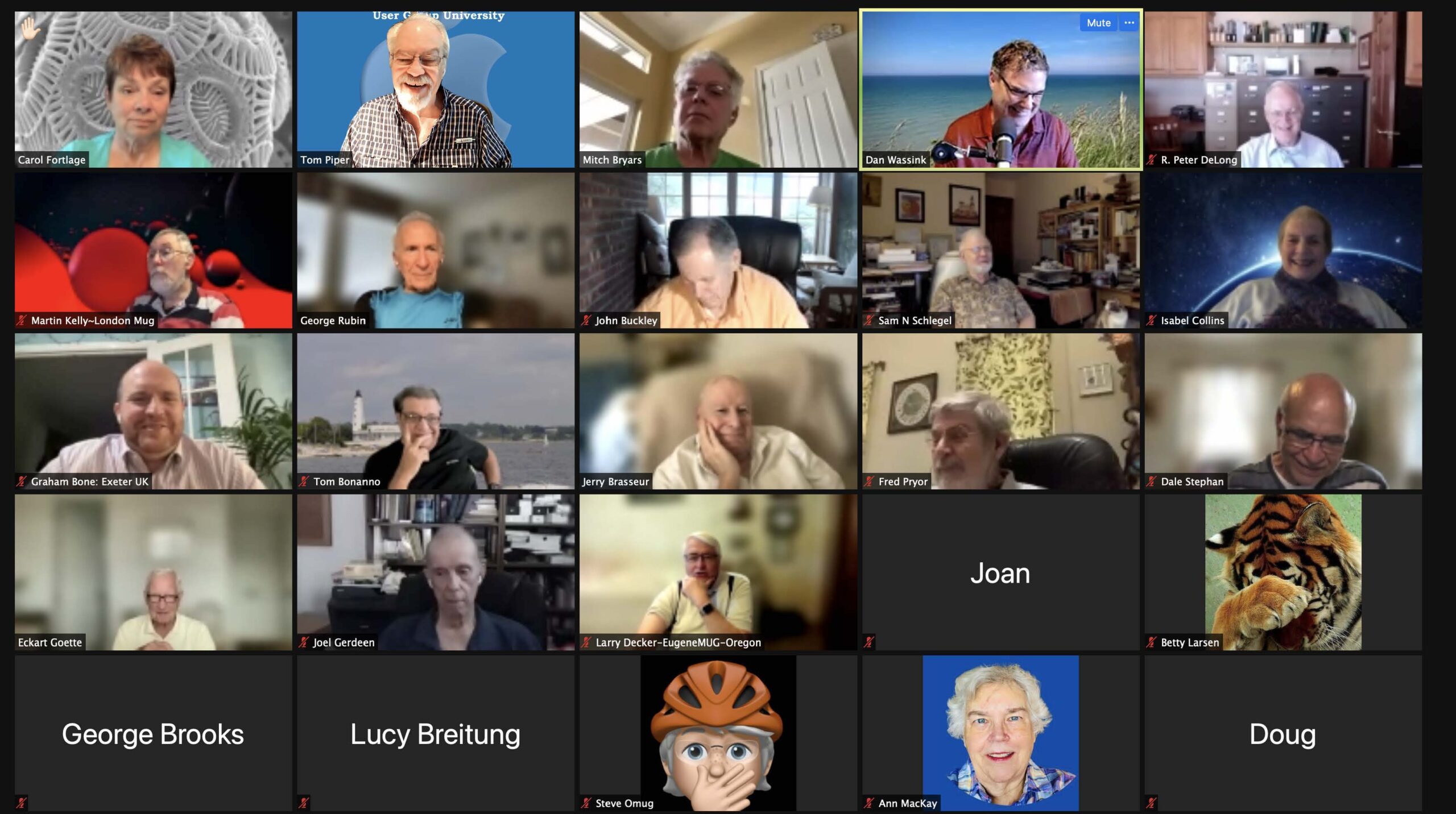
This Apple World User Group University online gathering of Apple user group leaders was held at 5:00pm CDST, on May 17, 2021, via Zoom. We had 30 participants who joined for the topic of “Sharing Between Groups”. The 63-minute video can be viewed at: https://youtu.be/CG5z7WTR9kY (unlisted on YouTube).
 Looking for a quick meeting topic? ASW and Apple.com have information that can help you get up to speed. New tools in macOS Monterey are designed to help users get more done, stay focused, and collaborate, while iPadOS 15 introduces a multitasking experience that is even more intuitive, making features like Split View and Slide Over easier to discover
Check out macOS Monterey Preview – First Look (L592879A-en_US) and iPadOS 15 Preview – First Look (L592887A-en_US).
Ambassadors, June is a great month to check out ASW!