by Saundra (Sandy) Foderick, Editor | May 18, 2021 | News & Events
 Like many people, I have missed getting together with friends in the user group community since the last Macworld, and even more over the last year. Still, I was surprised at how truly great it felt to hear from the long-time groups that left their names in the survey.
Each name brought a fond memory (in some cases many, many fond memories) and a reminder that the user group community is both vibrant and caring. With more than 70 responses, here are some of the groups that left comments and a hello (in alphabetical order):
| Apple Charlestown Apple Group |
Maryland Apple Corps, Inc. |
| appleJAC User Group |
MIAMUG (Midland, MI) |
| ApplePickers of Central Indiana |
Mountain View Computer Users Group, Sierra Vista, AZ |
| Ashland Macintosh User’s Group |
Naples MacFriends User Group Inc |
| Atlantic City Area Mac Users Group |
National Capital Apple Mac Users Group (NCA-MUG) |
| AUSOM Inc |
PMUG-NJ.ORG |
| Club HyperPomme Paris |
Portland (OR) Macintosh Users Group |
| Computer Users of Erie |
Prescott Mac Users Group |
| CVMUG – Conejo Ventura Macintosh User Group |
Silicon Mountain MacIntosh User Group |
| EAMUG Englewood,FL User Group |
South Suburban (Chicago) Mac Users Group |
| EMUG |
Suffolk Mac User Group |
| Exeter area Mac user group |
The Macintosh Guild |
| Franklin Apple Orchard |
The Oregon MacPioneers User Group (OMUG) |
| MAC2 (MAC2MUG) |
TMG Dayton |
| MacinTech |
TMUG – Tucson Macintosh Users Group |
| MacNexus |
Tucson Macintosh Users Group |
| MacValley User Group, Northridge, California |
VMUG (Victoria [BC] Mac and iOS User Group (vmug.bc.ca) |
Thanks for the comments and for sharing your thoughts, and thanks to Curt B. for suggesting the questions!
by Saundra (Sandy) Foderick, Editor | May 18, 2021 | News & Events
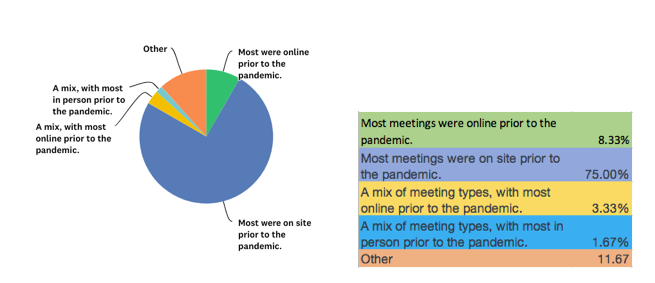
Responses show that prior to the pandemic most groups met face-to-face. True, well before the pandemic there were groups perfecting their streaming meeting skills while others excelled with fully online Zoom meetings, groups that were FaceTime experts and some experimented with truly novel formats (one group even met in a park with picnic blankets spaced 10′ apart). Still, most groups met face-to-face. Over the last 10-15 years, the number of solely online groups in the user group database has generally been around 10%. As one survey respondent said, “mostly on site, but dwindling numbers and meetings.” So, it is interesting to learn that some groups have been revitalized during the pandemic, helping members stay in touch during difficult times. Here are the results for pre-pandemic meeting formats:
(more…)
by Vendor Offers | May 18, 2021 | Apple World User Group University
by Tom Piper, Coordinator
This Apple World User Group University online gathering of Apple user group leaders was held at 5:00pm CDST, on May 17, 2021, via Zoom. We had 30 participants who joined for the topic of “Sharing Between Groups”. The 63-minute video can be viewed at: https://youtu.be/CG5z7WTR9kY (unlisted on YouTube).
This session opened with my welcome, plus a quick review of the meeting protocols. Doug Smith, Chair of the Apple User Group Advisory Board (AUGAB) members was present to support this call.
The format for this meeting was an open discussion with many participants sharing their perspectives and suggestions about attending “free” AUG events plus sharing presentations and other resources including John Buckley of Greater Albany AppleByters, Isabel Collins of Apple Users Society of Melbourne (Australia), Mike Kwasniak of Suffolk MUG (UK), Steve Welsh of Oregon MacPioneers Users, George Rubin and Eckart Goette of Naples MacFriends User Group, David Ginsberg of Suburban Chicago Users Group, Andy Suhaka of Macintech Users Group, Larry Decker of Eugene Macintosh Users Group, Carol Fortlage of The Villages Apple User Group, Joan Newman of SouthWest Florida Apple Computer Knowledge Society, Dale Stephan of Mac-in-Awe Apple Users Group, George Brooks of the Naples MacFriends User Group, Cassie Mac of the MacTechnic Ann Arbor Computer User Group, Dan Wassink of Dan’s Tutorials, Marty Welter of Central Wisconsin Apple Users Group, Ann McKay of Apple Charlestown User Group, Craig Jobbins of London Mac User Group and others.
(more…)
by Saundra (Sandy) Foderick, Editor | May 17, 2021 | News & Events
When it comes to deciding how to meet, when to meet, and where to meet, it can be hard to make everyone happy. (In fact, most user group officers will tell you that it can be hard to make many members happy regardless of the question…)
Here are some of the factors that groups said go into deciding on their meeting format and location:


by Saundra (Sandy) Foderick, Editor | May 16, 2021 | News & Events
In the survey, we asked for guidance and groups offered their thoughts. Interestingly, some of the factors that groups considered, such as aging membership, was cited as a reason for, and against, Zoom-type meetings 🙂
Here is some of the advice offered:
Some groups find benefits in the online meeting format
- In person meetings work for business and technology, but are restricted to the talent in the group. Zoom meetings work for technology lessons and can utilize talent from other groups!
- Easier to get speakers with online meetings.
- we have had great success with Zoom meetings but it won’t suit everyone.
- Guest speakers are more readily available because if Zoom or Skype access.
- New faces from distant members
- Going online for meetings has allowed us to regain users who found a long drive at night too difficult to attend.
- Our members come from a wide area. Several only attend infrequently. Having virtual meetings has allowed more members to attend (although overall participation is down slightly). Other than that, we really miss the face to face and social aspects.
- online, other mac groups and former members joined us back
- Zoom turned out to be a viable way of meeting, which surprised some of us.
- Online contests can be fun, but be sure to allocate much time to the events!
- Know Zoom controls at an advanced level.
- We were surprised and delighted that our members mostly took to zoom like ducks to water. Though we all miss in-person socializing, we get better attendance and more efficient meetings using Zoom. The ability to record and make available for download past meetings has been a popular feature in our group.
- Platform that allows screen sharing is important. Some with hearing problems like it online to control volume. Also use closed captioning.
- Zoom is a very good tool
- Online remote meetings with perhaps an in-person once a year get together seems to really interest our members.
- You may need to help people with the first online meeting
Some groups see benefits in meeting face to face (more…)
by Saundra (Sandy) Foderick, Editor | May 14, 2021 | Resources, User Group Meeting Materials
 Your members may enjoy Today at Apple this week for live virtual sessions presented in American Sign Language and VoiceOver. Better yet, there are great short Apple Support videos walking users through the use of Live Listen and How to navigate iPad Pro with gestures.
Check them out:
Today at Apple
How to use Live Listen
How to Navigate iPad Pro with Gestures
by Saundra (Sandy) Foderick, Editor | May 14, 2021 | User Group Meeting Materials
Many groups have had a positive response to accessibility as a meeting topic. Apple’s Accessibility home page says that the true value of a technology is not measured by how powerful it is, but by how much it empowers the user, and every Apple product contains amazing and empowering accessibility features right out of the box. From Magnifier, to Switch Control, Back Tap, VoiceOver, headphone accommodations, made for iPhone hearing aids, Live Listen, AssistiveTouch, Guided Access, typing feedback, text-to-speech, fitness algorithms for wheelchair users, and more, there are features to make every user’s tasks easier.
Another great way to enjoy an accessibility presentation is to use Apple Support’s YouTube videos, covering the basics of using the assistive technologies that are built into every Mac, iPad, iPhone, and Apple Watch.
Check it out.
https://www.apple.com/accessibility/
Apple Support on YouTube – Accessibility
by Saundra (Sandy) Foderick, Editor | May 12, 2021 | News & Events
 Are your members interested in the newest version of Clips? Clips is an iOS-only free app for making and sharing fun videos with text, effects, graphics, and more? ASW has information to help you plan a great meeting:
Clips – First Look (L573379A-en_US), iPadOS 14 – First Look (L585034A-en_US), and iPad – Then and Now (L575791A-en_US) can provide the information you need.
Ambassadors: May is a great month to check out ASW.